Houston, TX

Information
- [email protected]
- Houston, TX
Loading
Houston, TX
RMA reads emails and attachments, extracts the facts, builds a clean submission, and pushes it to your Policy System and Rating System - so your team reviews, decides, and moves.
Every submission moves through a five-step AI + analyst loop designed around the way MGAs already operate.
Agencies send emails with apps, driver and vehicle schedules, and loss runs (PDF, DOCX, XLSX). RMA ingests the email and every attachment - no portals or retraining required.
Pages are split to images and passed through OCR; documents are auto-typed (app, drivers, vehicles, loss runs). Structured text goes to a vector store so downstream Q&A stays precise.
Drivers, vehicles, losses, and key dates are normalized into structured rows; duplicates, missing values, and terms are surfaced for a rapid analyst pass.
An underwriter or pre-UW skims a single workspace with tabs for Insured, Cards, Drivers, Vehicles, Loss Runs, Emails, and Duplicates; updates are one click. "Ask RMA" lets you query any file in plain English.
When ready, send to your Policy System or Rating System via API, update Policy System status and metadata, and keep a full activity log. Endpoints include Rating System submissions, Policy System status updates, and producer or insured selection - every action is tracked.
Each capability links to real UI states - no vaporware. Use the live demo below to click through the experience.
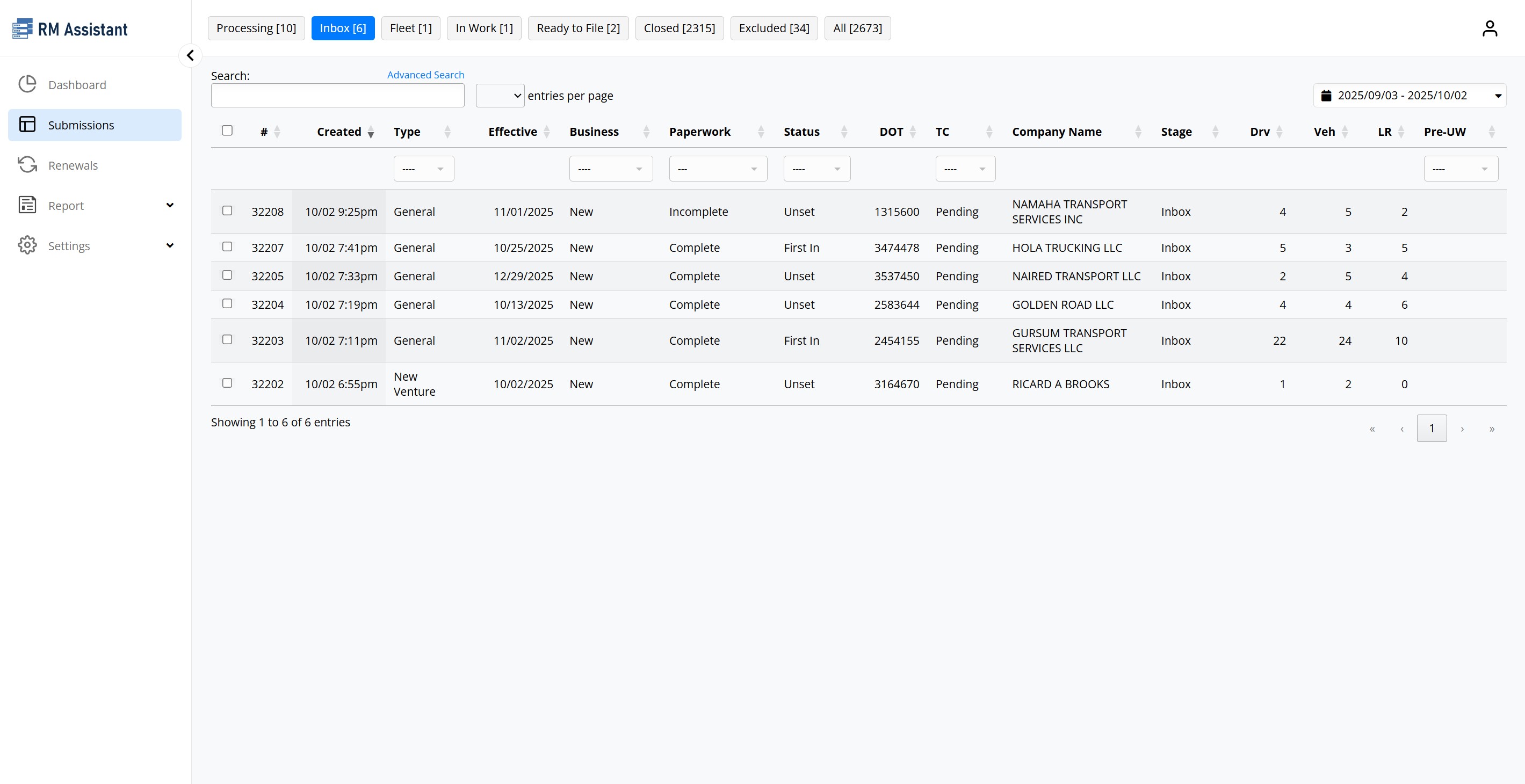
DataTable of all incoming and processing items with stage filters, date filters, and counts - ready for ops. Server-side endpoints power both state counts and table exports.
Insured | Cards | Drivers | Vehicles | Loss Runs | Emails | Duplicates | Activity | Ask RMA | AI | Log. Everything is visible in the popup review workspace.
Daily cron imports upcoming expirations from your Policy System into RMA renewals queues (14, 21, 30, 45 day buckets), sends reminders, and advances stages - mirrored in the Renewals table.
Tokens cost is calculated from file pages and AI token usage; per-submission cost estimates surface in the workspace so finance and ops stay aligned.
Interactive list shows ID, dates, DOT, company, status, counts, and underwriter. Quick-open the renewal popup for address, cards, emails, activity, and logs.
RMA ingests email bodies and attachments in parallel. It splits files, runs OCR + AI extraction, and processes up to 3-10 submissions concurrently while the UI streams results back.
Clean endpoints cover search, status updates, file upload, and email sending, so it is simple to plug into workflows, RPA bots, or any Policy System. The same calls power the UI.
One-click Auto Response drafts an agent-friendly email listing missing driver, vehicle, loss run, and application data, letting your team review and send in seconds.
Quantify the upside before you switch anything. Plug in your own throughput, human processing time, and analyst rates - RMA returns a conservative ROI range.
ROI formula: ROI = (Current annual labor cost - RMA annual cost) / RMA annual cost
Current annual labor cost = Yearly submissions × Human processing time (mins)/submission ÷ 60 × Labor rate cost $/hour.
RMA annual cost = Yearly submissions × RMA processing time (10 mins)/submission ÷ 60 × Labor rate cost $/hour.
Total savings = Current annual labor cost − RMA annual cost. ROI compares that savings to the RMA investment.
People required = Yearly submissions ÷ (Daily capacity × 20 working days). Daily capacity = 8 working hours × 60 ÷ Human processing time.
RMA AI assumes ~10 mins per submission with one analyst. Adjust the assumptions in your workbook when you speak with the team.
Step through a sanitized sample: submissions queue, analyst workspace, renewals, Ask RMA, and downstream push. Every screenshot is sourced from the real product.
Book a 20-min walkthrough: Bring a live submission; we'll measure accuracy, cycle time, and projected ROI together.
Try the interactive demo: See the intake -> review -> downstream push flow, risk-free.
Get a ROI estimate: Put your own submission volume and handling time into the calculator above — the formula is shown in full, so you can share the working internally with leadership and IT.
No - RMA accelerates them. You decide what is submitted; human-in-the-loop stays central. UI tabs and activities show what changed, by whom, and when.
All AI costs are calculated and shown per submission; logs and activities are retained for audit.
Policy System expirations import with producer and insured metadata, staged into queues, and reminders go out automatically.
Yes - controls for Policy System (status, producer and insured selection) and Rating System submission endpoints exist today.
Filing surplus lines taxes too? SLTax360 pairs the same AI + dedicated-human model with all 50 state portals. And when the submissions are flowing, our Data Analytics team turns your book into dashboards a carrier will actually trust.